
HTML to Markdown 用TS实现思路
- LW
- Typescript
- March 19, 2025
Table of Contents
根据 typescript 项目实战一书,整理的的实现一个markdown预览器的实现思路
核心数据结构:
- TagType 枚举定义支持的标签类型
- TagTypeToHtml 类实现标签类型到HTML的映射
文档管理:
- IMarkdownDocument 接口定义文档操作契约
- MarkdownDocument 实现具体文档存储
访问者模式:
- 通过 IVisitor/IVisitable 接口实现双分派
- 基类 VisitorBase 封装公共逻辑
具体访问者处理不同标签类型 责任链模式:
- Handler 抽象类定义处理链基础
- 具体处理器实现 CanHandle 逻辑
- 链式结构:Header1 → Header2 → Header3 → HorizontalRule → Paragraph
工厂模式:
- ChainOfResponsibilityFactory 负责构建完整的处理链
前端集成:
- HtmlHandler 类桥接 DOM 操作与 Markdown 转换
实现实时预览功能 辅助工具:
- LineParser 处理行解析逻辑主要使用到
实现逻辑
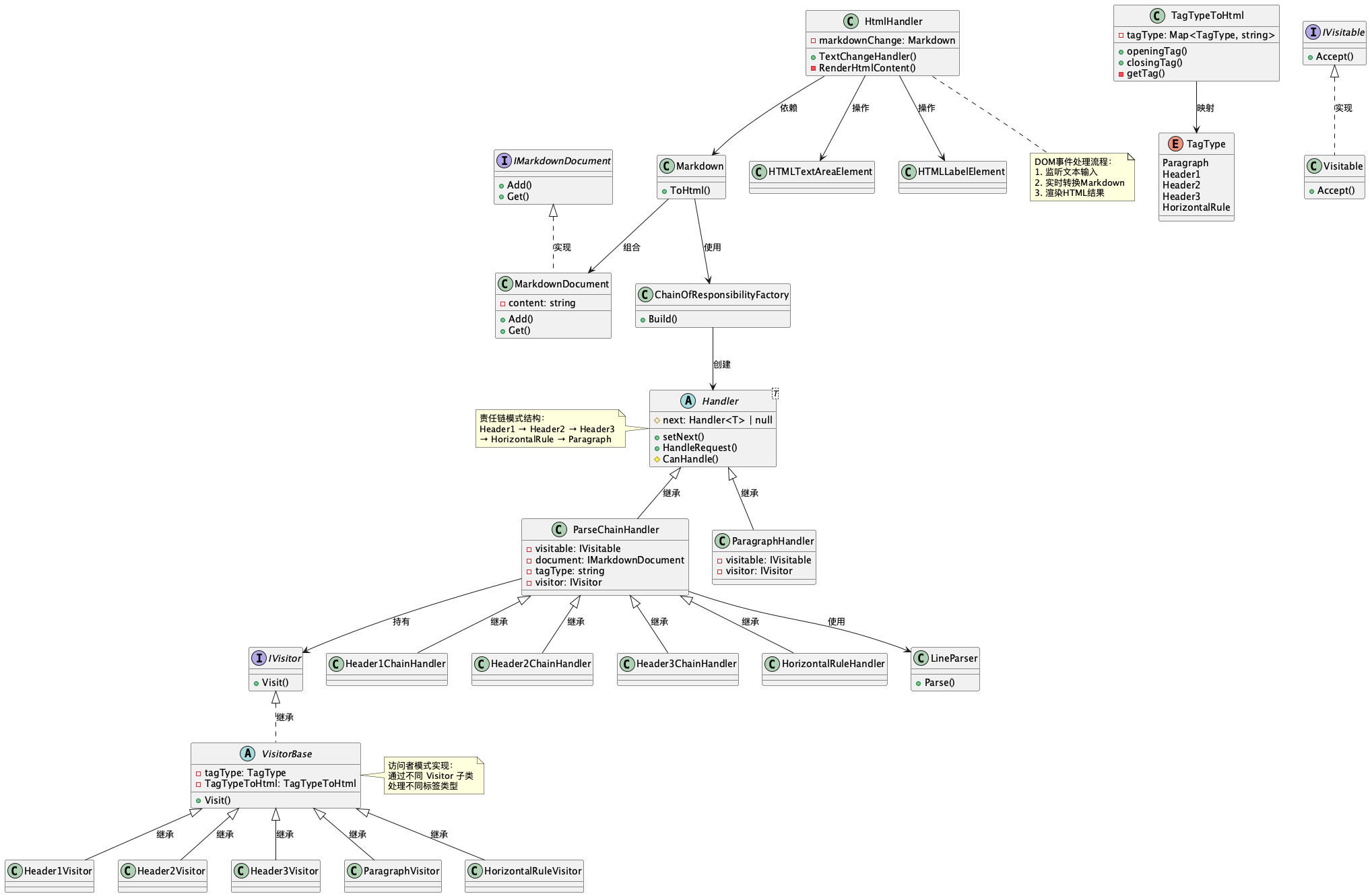
代码实现
// markdown 标签 映射为HTML
enum TagType {
    Paragraph,
    Header1,
    Header2,
    Header3,
    HorizontalRule,
}
// Tag映射类
// tag 映射为html  html 是成对出现的
// 符合单一职责, 就是将tagType 映射到HTML标签
// 面向对象重要的原则(SOLID),可以自己领悟提高自己
class TagTypeToHtml {

    // readonly 实例化类后,不能再该类的其他位置重新创建tagType
    // 也就是 this.tagType = new Map<TagType,string>() 不会在被调用
    private readonly tagType: Map<TagType, string> = new Map<TagType, string>();

    constructor() {
        // 初始化tagType
        this.tagType.set(TagType.Header1, "h1");
        this.tagType.set(TagType.Header2, "h2");
        this.tagType.set(TagType.Header3, "h3");
        this.tagType.set(TagType.Paragraph, "p");
        this.tagType.set(TagType.HorizontalRule, "hr");
    }

    // 获取开标签和关闭标签(完后后可以删除)
    public openingTag(tagType: TagType): string {
        let tag = this.tagType.get(tagType);
        if (tag !== null) {
            return `<${tag}>`;
        }
        return `<p>`;
    }

    public closingTag(tagType: TagType): string {
        let tag = this.tagType.get(tagType);
        if (tag !== null) {
            return `</${tag}>`;
        }

        return `</p>`;
    }

    // 聚合openTag 和 closingTag 功能,openingTagPattern 传 "</" || "<"
    private getTag(tagType: TagType, openingTagPattern: string): string {
        let tag = this.tagType.get(tagType);
        if (tag !== null) {
            return `${openingTagPattern}${tag}>`;
        }
        return `${openingTagPattern}p>`;
    }

    // 于是便有了新的开/闭tag方法
    public OpeningTag(tagType: TagType): string {
        return this.getTag(tagType, "<");
    }

    public ClosingTag(tagType: TagType): string {
        return this.getTag(tagType, "</");
    }
}

interface IMarkdownDocument {
    // 使用字符串数组,只使用一个字符串,方便处理
    Add(...content: string[]): void;

    Get(): string;
}

// 实现
class MarkdownDocument implements IMarkdownDocument {
    private content: string = "";

    Add(...content: string[]): void {
        content.forEach((element) => {
            this.content += element;
        });
    }

    Get(): string {
        return this.content;
    }
}

// 每次解析都将一行转换成ParseElement class
class ParseElement {
    CurrentLine: string = "";
}

// 使用访问者模式 处理更新 markdown 文档
// 设计模式的一种  处理问题的一种解决方案
// 访问者模式 区分算法 和 算法操作对象
// 根据对 底层markdown对ParseElement类应用不同偶能的操作,创建不同的MarkdownDocument类
// 约定 实现 IVisitor 和 IVisitable
interface IVisitor {
    Visit(token: ParseElement, markdownDocument: IMarkdownDocument): void;
}

interface IVisitable {
    Accept(
        visitor: IVisitor,
        token: ParseElement,
        markdownDocument: IMarkdownDocument
    ): void;
}

// 执行Visit时,使用TagTypeToHtml类,向MarkdownDocument添加对应的HTML开标签,一行文本 以及 HTML闭合标签
abstract class VisitorBase implements IVisitor {
    protected constructor(
        private readonly tagType: TagType,
        private readonly TagTypeToHtml: TagTypeToHtml
    ) {
    }

    Visit(token: ParseElement, markdownDocument: IMarkdownDocument): void {
        markdownDocument.Add(
        this.TagTypeToHtml.OpeningTag(this.tagType),
            token.CurrentLine,
            this.TagTypeToHtml.ClosingTag(this.tagType)
    )}
}

// 只有一种功能 如果判断是#开头,则将当前行内容添加到H1标签中,同时需要删除#
class Header1Visitor extends VisitorBase {
    constructor() {
        super(TagType.Header1, new TagTypeToHtml());
    }
}

class Header2Visitor extends VisitorBase {
    constructor() {
        super(TagType.Header2, new TagTypeToHtml());
    }
}

class Header3Visitor extends VisitorBase {
    constructor() {
        super(TagType.Header3, new TagTypeToHtml());
    }
}

class ParagraphVisitor extends VisitorBase {
    constructor() {
        super(TagType.Paragraph, new TagTypeToHtml());
    }
}

class HorizontalRuleVisitor extends VisitorBase {
    constructor() {
        super(TagType.HorizontalRule, new TagTypeToHtml());
    }
}

class Visitable implements IVisitable {
    Accept(
        visitor: IVisitor,
        token: ParseElement,
        markdownDocument: IMarkdownDocument
    ): void {
        visitor.Visit(token, markdownDocument);
    }
}

// 使用责任链条模式 来实现决定使用什么HTML标签
abstract class Handler<T> {
    // 使用protected 做访问修饰限制
    // 使用联合类型 next可以为null
    protected next: Handler<T> | null = null;

    //setter 指定下一个类
    public setNext(next: Handler<T>): void {
        this.next = next;
    }

    public HandleRequest(request: T): void {
        // 调用抽象方法
        // 判断是否可 调用
        if (!this.CanHandle(request)) {
            if (this.next !== null) {
                this.next.HandleRequest(request);
            }
        }
        return;
    }

    protected abstract CanHandle(request: T): boolean;
}

class ParseChainHandler extends Handler<ParseElement> {
    private readonly visitable: IVisitable = new Visitable();

    constructor(
        private readonly document: IMarkdownDocument,
        private readonly tagType: string,
        private readonly visitor: IVisitor
    ) {
        super();
    }

    protected CanHandle(request: ParseElement): boolean {
        let split = new LineParser().Parse(request.CurrentLine, this.tagType);
        if (split[0]) {
            request.CurrentLine = split[1];
            this.visitable.Accept(this.visitor, request, this.document);
        }
        return split[0];
    }
}

// 没有标签 默认文本是一个段落
class ParagraphHandler extends Handler<ParseElement> {
    private readonly visitable: IVisitable = new Visitable();
    private readonly visitor: IVisitor = new ParagraphVisitor();

    protected CanHandle(request: ParseElement): boolean {
        this.visitable.Accept(this.visitor, request, this.document);
        return true;
    }

    constructor(private readonly document: IMarkdownDocument) {
        super();
    }
}

// markdown 标签具体处理
// 责任链 和 访问者 关联
class Header1ChainHandler extends ParseChainHandler {
    constructor(document: IMarkdownDocument) {
        super(document, "# ", new Header1Visitor());
    }
}

class Header2ChainHandler extends ParseChainHandler {
    constructor(document: IMarkdownDocument) {
        super(document, "## ", new Header2Visitor());
    }
}

class Header3ChainHandler extends ParseChainHandler {
    constructor(document: IMarkdownDocument) {
        super(document, "### ", new Header3Visitor());
    }
}

class HorizontalRuleHander extends ParseChainHandler {
    constructor(document: IMarkdownDocument) {
        super(document, "--- ", new HorizontalRuleVisitor());
    }
}

// 判断 和 切割 str
class LineParser {
    public Parse(value: string, tag: string): [boolean, string] {
        let output: [boolean, string] = [false, ""];
        output[1] = value;
        if (value === "") {
            return output;
        }
        let split = value.startsWith(`${tag}`);

        if (split) {
            output[0] = true;
            output[1] = value.substring(tag.length);
        }
        return output;
    }
}

// 工厂模式串联 责任链
class ChainOfResponsibilityFactory {
    Build(document: IMarkdownDocument): ParseChainHandler {
        // 初始化责任链
        let header1: Header1ChainHandler = new Header1ChainHandler(document);
        let header2: Header2ChainHandler = new Header2ChainHandler(document);
        let header3: Header3ChainHandler = new Header3ChainHandler(document);
        let horizontalRule: HorizontalRuleHander = new HorizontalRuleHander(document);

        let paragraph: ParagraphHandler = new ParagraphHandler(document);

        // 责任连模式 h1 > h2 > h3 > hr > paragraph
        header1.setNext(header2);
        header2.setNext(header3);
        header3.setNext(horizontalRule);
        horizontalRule.setNext(paragraph);

        return header1;
    }
}

// 封装调用
class Markdown {
    public ToHtml(text: string): string {
        let document: IMarkdownDocument = new MarkdownDocument();

        // 通过Build工厂方法 返回ParseChainHandler
        let header1: Header1ChainHandler = new ChainOfResponsibilityFactory()
            .Build(document);

        // 按照回车 区分行
        let lines: string[] = text.split(`\n`);
        for (let index = 0; index < lines.length; index++) {
            let parseElement: ParseElement = new ParseElement();
            parseElement.CurrentLine = lines[index];
            header1.HandleRequest(parseElement);
        }

        return document.Get();
    }
}

// HTML处理类
class HtmlHandler {
    private markdownChange: Markdown = new Markdown();

    // 左右文本变化
    public TextChangeHandler(id: string, output: string): void {
        // 1 获取markdown 文本 dom节点
        let markdown = <HTMLTextAreaElement>document.getElementById(id);
        let markdownOutput = <HTMLLabelElement>document.getElementById(output);

        // 判断dom节点
        if (markdown !== null) {
            markdown.onkeyup = () => {
                // markdown 有值 填写到 右边
                // if (markdown.value) {
                //   markdownOutput.innerHTML = markdown.value;
                // } else {
                //   markdownOutput.innerHTML = "<p></p>";
                this.RenderHtmlContent(markdown, markdownOutput);
            };
            window.onload = () => {
                this.RenderHtmlContent(markdown, markdownOutput);
            };
        }
    }

    private RenderHtmlContent(
        markdown: HTMLTextAreaElement,
        markdownOutput: HTMLLabelElement
    ) {
        if (markdown.value) {
            markdownOutput.innerHTML = this.markdownChange.ToHtml(markdown.value);
        } else {
            markdownOutput.innerHTML = "<p></p>";
        }
    }
}